Atlas - manage your database schema as code
Pre-requisites
Have you considered defining your database schemas in code or performing migrations? If not, then this article might pique your interest. It will guide you on how to accomplish this using Atlas and Terraform.”
Now let’s get down to business and shift our focus to demo. In general, I have prepared code for a demo that sets up a database in the AWS cloud, specifically an RDS (Relational Database Service), and then proceeds to create schemas using the Atlas provider. To accomplish this, you will need to define the AWS and Atlas providers.
terraform {
    required_providers {
        aws = {
        source  = "hashicorp/aws"
        version = "~> 3.0"
        }
        atlas = {
          source = "ariga/atlas"
          version = "~> 0.4.5"
        }
    }
}
resource "aws_db_instance" "this" {
identifier = "postgres-demo"
instance_class = "db.t3.micro"
allocated_storage = 5
engine = "postgres"
engine_version = "15.5"
skip_final_snapshot = true
publicly_accessible = true
vpc_security_group_ids = [aws_security_group.this.id]
username = "dummy"
password = random_string.this.result
}
data "atlas_schema" "schema" {
dev_url = "postgres://dummy:${random_string.this.result}@${aws_db_instance.this.address}:5432/postgres"
src = file("${path.module}/schema.hcl")
depends_on = [aws_db_instance.this]
}
resource "atlas_schema" "schema" {
hcl = data.atlas_schema.schema.hcl
url = "postgres://dummy:${random_string.this.result}@${aws_db_instance.this.address}:5432/postgres"
depends_on = [aws_db_instance.this]
}
In general, the question probably arises as to how I built schema.hcl? The syntax can be found here: Schema syntax
Or you can prepare an SQL query and then inspect the database and automatically get the result into schema.hcl: Here is a guide on how to do it Inspection
To test this, please clone my repo Github
terraform planterraform apply
│ CREATE SCHEMA "cd"
│ CREATE TABLE "public"."employees" ("id" serial NOT NULL, "name" character varying(100) NULL, "email" character varying(100) NULL, PRIMARY KEY ("id"))
│ CREATE TABLE "cd"."facilities" ("facid" integer NOT NULL, "name" character varying(100) NOT NULL, "membercost" numeric NOT NULL, "guestcost" numeric NOT NULL,
│ "initialoutlay" numeric NOT NULL, "monthlymaintenance" numeric NOT NULL, PRIMARY KEY ("facid"))
│ CREATE TABLE "cd"."members" ("memid" integer NOT NULL, "surname" character varying(200) NOT NULL, "firstname" character varying(200) NOT NULL, "address" character
│ varying(300) NOT NULL, "zipcode" integer NOT NULL, "telephone" character varying(20) NOT NULL, "recommendedby" integer NULL, "joindate" timestamp NOT NULL,
│ PRIMARY KEY ("memid"), CONSTRAINT "members_recommendedby_fkey" FOREIGN KEY ("recommendedby") REFERENCES "cd"."members" ("memid") ON UPDATE NO ACTION ON DELETE SET
│ NULL)
│ CREATE TABLE "cd"."bookings" ("bookid" integer NOT NULL, "facid" integer NOT NULL, "memid" integer NOT NULL, "starttime" timestamp NOT NULL, "slots" integer NOT
│ NULL, PRIMARY KEY ("bookid"), CONSTRAINT "bookings_facid_fkey" FOREIGN KEY ("facid") REFERENCES "cd"."facilities" ("facid") ON UPDATE NO ACTION ON DELETE NO
│ ACTION, CONSTRAINT "bookings_memid_fkey" FOREIGN KEY ("memid") REFERENCES "cd"."members" ("memid") ON UPDATE NO ACTION ON DELETE NO ACTION)
│
╵

Apply complete! Resources: 4 added, 0 changed, 0 destroyed.
➜  terraform_atlas git:(main) ✗
After applying Terraform, I connected to RDS using my IntelliJ IDEA and verified that the database schema and table were successfully created. It appears that everything is functioning as expected
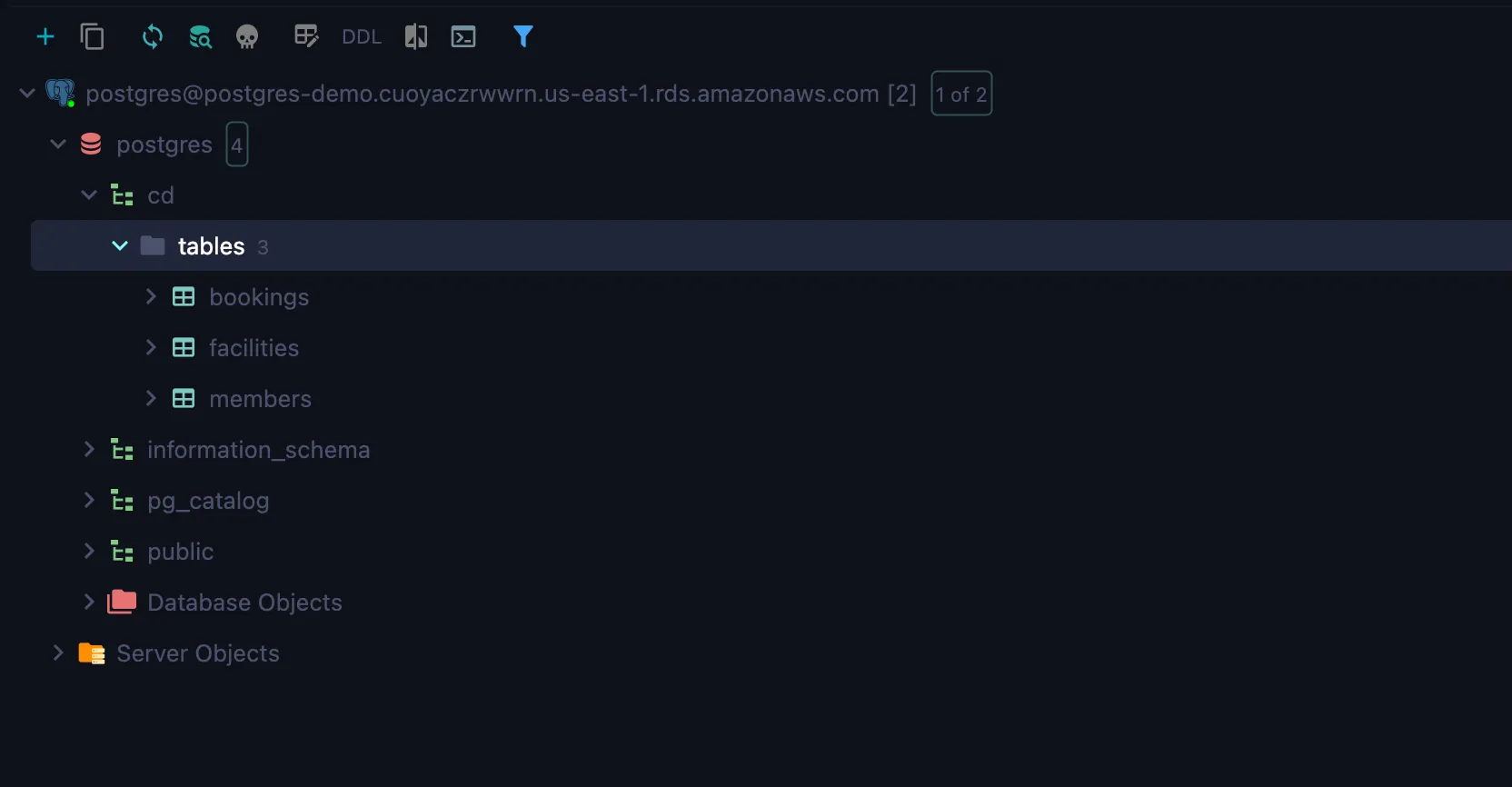
You can modify the schema in schema.hcl file and run terraform apply again and check if the schema has changed.
In the next articles, I will show you how to use Atlas to manage database migration schemas.
Summary
In this article, I showed you how to manage database schemas using Atlas and Terraform. I hope you got a dose of knowledge out of it and went through the demo
Related Posts
Harnessing the Power of the Three Musketeers with Terraform
Explore the potent combination of the Three Musketeers pattern and Terraform, a duo that offers unparalleled automation capabilities
VolSync - Kubernetes Volume Replication Made Simple
Implement asynchronous volume replication for Kubernetes using VolSync with MySQL database synchronization.